Enterprise SATA SSDs are sold on three things: capacity, endurance class and price. The endurance class is the one buyers get wrong. The word on a quotation says nothing about how much writing the drive will absorb over its life, and the two numbers that do say something are almost never quoted together.
There is a second gap, at the receiving bay. All three classes ship in the same case with the same connector and a label that varies by a handful of characters, so a mixed-use part and a read-intensive part cannot be told apart by looking. Both gaps have the same fix: read the printed figures and do the arithmetic on them.
Three endurance classes, and what sets them apart
The classes use the same NAND, the same controller families and the same 7 mm case. What changes is how much of the NAND is held back as spare area. A read-intensive drive gives the host nearly all of the die; a write-intensive drive keeps a much larger share in reserve. Fewer program-and-erase cycles reach the cells the host can address, so the rated life rises, and the capacity you paid for falls.
- Read-intensive, about one drive fill a day. Written once and read many times: content delivery, object storage, boot volumes, archive. Stock includes the Samsung PM893a 480 GB at 876 TBW, the PM883 480 GB at 683 TBW and the Micron 5200 ECO 960 GB at 1,750 TBW.
- Mixed-use, about three fills. For volumes that get rewritten: virtualization datastores, database files, log partitions, media caches. The SM883 480 GB and the PM897a 480 GB both carry 2,628 TBW at three fills, and the MLC-based M510DC 480 GB is rated 1,850 TBW at 2.1 fills, a little under the two TLC parts.
- Write-intensive, five fills. Volumes where the writing is the workload: ingest buffers, recording targets, write caches. The Micron 5100 MAX 480 GB is rated 4,400 TBW.
Moving up a class costs money per gigabyte, and it also costs read-side and streaming performance, because the extra spare area displaces both. The first cost is on the quotation. The second one shows up later, as latency under load.
Checking a DWPD rating with one division
DWPD has a fixed definition, so it can be audited in a line of arithmetic: TBW ÷ (capacity in TB × 365 × 5). A 960 GB drive rated at 1,750 TBW works out at 1,750 ÷ (0.96 × 1,825) = 1.0. A 3.84 TB drive at 7,700 TBW gives 7,700 ÷ (3.84 × 1,825) = 1.1.
Run the same division on a listing and the answer is either close to 1.0 or it is not, which tells you whether the two published figures came from the same capacity. It also turns a percentage into a quantity: 1.0 on a 960 GB drive means 959 GB of writes a day, while 0.6 on a 7.68 TB drive means 4,603 GB a day. The second drive shows the lower number and carries almost five times the daily allowance.
So the figure to size a volume against is TBW. DWPD is how the class gets described in a catalog; TBW is what the drive will actually absorb.
The write budget stops doubling near the top of a range
Inside one family the write budget roughly tracks capacity, unit for unit. Micron’s 5200 ECO runs 870, 1,750, 3,500 and 7,700 TB across 480 GB, 960 GB, 1.92 TB and 3.84 TB, which holds the rating at about one fill a day the whole way. The 7.68 TB member then arrives with 8,400 TB: twice the capacity of the 3.84 TB drive for 9% more write budget, and the rating drops to 0.6.
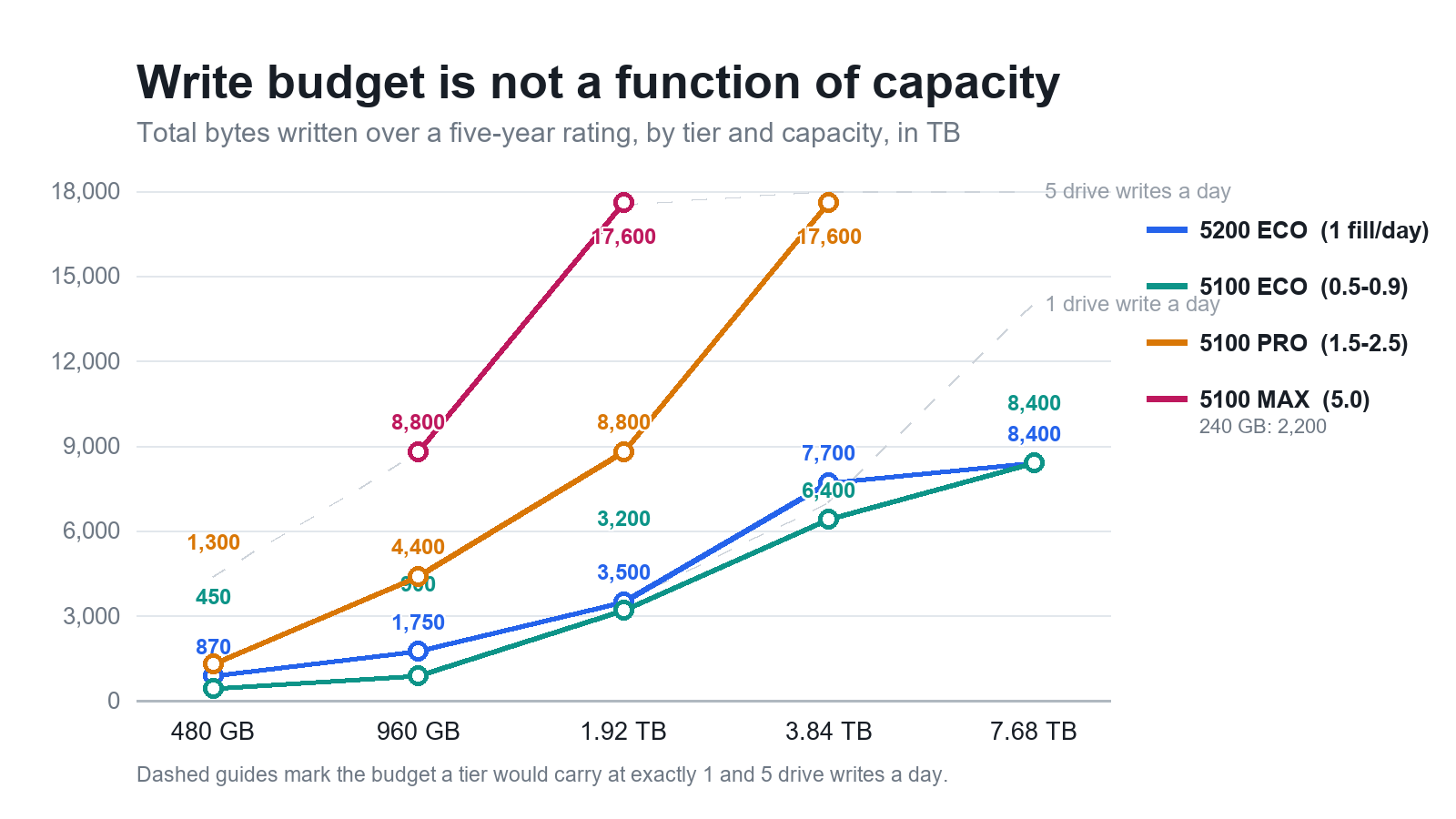
The published figure records that decision rather than arguing for it: the budget stayed near the previous capacity while the capacity itself doubled. A one-fill rating at 7.68 TB would have required 7,680 GB of writes every day for five years, which is 14,016 TB, and the family publishes 8,400.
Which makes the largest capacity in a range the usual worst place to buy endurance. The 3.84 TB member carries 2,005 TB of budget per terabyte of capacity; on the 7.68 TB drive it is 1,094, about 45% less. Where write tolerance is the requirement, the smaller drive is the better purchase and the larger one is for density. The 7.68 TB listing sets out where that density pays for itself.
Random write is where the classes separate
Put four generations of 480 GB drives side by side and sequential write covers 300 to 530 MB/s, a spread of about 1.7×. Random 4 KB write covers 9K to 74K IOPS, more than 8×. The class is visible in the second figure and all but invisible in the first.
- The read-intensive group falls between 9K and 33K: PM883 480 GB at 14K, PM893a 480 GB at 17K, 5200 ECO 480 GB at 33K. The same family's 7.68 TB member drops to 9.5K, which is what holding a fill-a-day rating across seven times the bytes costs in small-block parallelism.
- Mixed-use parts run from 23K to 60K: M510DC 480 GB at 23K, SM883 480 GB at 27K, PM897a 480 GB at 60K.
- The write-intensive 5100 MAX 480 GB quotes 74K, the highest random write figure we list at this capacity.
A 4 KB write has to erase a block before it can program, and spare area is what lets the controller do that erasing while the host keeps sending writes. Take the spare area away and the write path queues earlier. The queue shows up as latency at the host long before it shows up as a lower MB/s number in a benchmark, which is why a drive that looks adequate on paper can stall a busy volume.
On a datastore with several concurrent small writers, the gap between 17K and 60K is a difference in service level, and it widens as the volume fills.
Sequential write is capped by the bus
SATA 6 Gb/s carries roughly 600 MB/s of signaling and delivers about 550 MB/s once protocol overhead is accounted for. Write reaches that ceiling less easily than read. The quickest drives we list read at 560 MB/s and write at 530; nearly everything else in the category writes at 520 MB/s whatever the class, generation or price.
So a capacity step inside a family cannot buy streaming speed once the drive is at the ceiling. The 5200 ECO reaches 520 MB/s at 960 GB and holds it to 7.68 TB. Getting past the ceiling means changing interface, which is a platform decision rather than a drive one. While the platform stays on SATA, the axis worth paying for is endurance and small-block behavior.
What the move to 64-layer NAND changed
64-layer NAND doubled bits per die, so a given capacity is built from fewer packages than the 32-layer part it replaced. Endurance rose and random read fell at the small capacities, because parallelism for small-block reads comes largely from package count.
At 480 GB the read-intensive drive went from the 5100 ECO at 450 TBW to the 5200 ECO at 870, a 93% gain at the same capacity, case and 540 MB/s read speed. Random read moved the other way: 81K against 93K, a 13% regression that appears in no marketing table. By 960 GB the penalty is gone, 95K against 93K, because both generations carry enough packages at that size.
At the top of a range the two generations converge. The 7.68 TB members of the 5100 and 5200 families share 540/520 MB/s, 8,400 TBW, the same 0.6 rating and random figures within 2K of each other. At that capacity the choice comes down to condition and price.
Reading a label at goods-in
Nothing about the appearance of the drive distinguishes a one-fill part from a five-fill part. The class and the capacity exist only in the printed fields, which is why goods-in errors are found months later, in service, rather than on the bench where they could be fixed.
- Model field. Micron encodes the class in the last three characters: TDC is 5200 ECO, TDD is PRO, TDN is MAX. The previous generation used TBY, TCB and TCC in the same positions. Where the top of a label carries an OEM brand, the model field usually still holds the Micron code, so read that field rather than the branding.
- Capacity field. Terabyte sizes are written in decimal shorthand: 1T9 is 1.92 TB, 3T8 is 3.84 TB, 7T6 is 7.68 TB. 480 and 960 appear as plain digits. Two cartons whose labels differ by three characters can differ by a factor of two in capacity.
- Ordering-code suffix. The string after the hyphen encodes build configuration and channel, so standard, self-encrypting and OEM builds of the same capacity carry different suffixes. If a platform requires encryption at rest, specify the self-encrypting build; do not assume it arrives enabled.
- Input rating. A label reading 5 V 1.7 A is stating a connector ceiling of 8.5 W, not what the drive draws. Size the rail against the connector figure and the thermal budget against the rated power, which on these drives is 3.6 W writing sequentially and 1.5 W idle.
- SMART. Power-on hours, total LBAs written and percentage used say more about a used drive than any amount of handling inspection. A drive at 40% used has spent 40% of its rated life.
Matching a class to a workload
Most quotations we write fall into five patterns.
| Workload | What dominates | Class to specify |
|---|---|---|
| CDN cache, object storage, media archive | Random read, write once | Read-intensive, one fill a day |
| Boot and log pair on a hypervisor | Small writes, low queue depth | Read-intensive, or mixed-use if the logs are busy |
| Virtualization datastore, database volume | Mixed read and write, sustained | Mixed-use, three fills a day |
| Ingest buffer, recording target, write cache | Concurrent small writes | Write-intensive, five fills a day |
| Backup target, secondary copy | Sequential writes, little rewriting | Read-intensive at the largest capacity the budget allows |
What the table cannot show is where endurance policy meets arithmetic. Policy is usually written as a share of capacity, whether that is rewriting a fifth of the volume daily or keeping three copies of a dataset, and every such policy costs more of the allowance as the drive grows while the allowance at the top of a range has barely grown. A policy tuned on 1.92 TB drives needs re-running before it goes onto 7.68 TB drives. Where rebuild time matters, two smaller drives usually beat one large one: a full rebuild of 7.68 TB at 520 MB/s takes about four hours, against two for 3.84 TB.
How we test and ship
Drives are checked before they are listed, not after they ship. Label fields are recorded in full, SMART is read and kept against the individual unit, and each drive gets a full-surface read scan, its own extended self-test run to completion, sequential and random performance measured in steady state on a native SATA port, latency sampled at queue depth one, a TCG Enterprise state query and a secure erase before packing. Drives go out in anti-static bags with foam, and stock normally leaves our warehouse within three to seven working days with tracking issued at dispatch.
Current capacity and class availability are in the enterprise SSD catalog. If you are buying on the secondary market, our guide to verifying used parts covers the inspection discipline that applies to any component, not only to drives. Send us the workload and we will say which class it belongs in, including when the answer is that the drive you asked about is the wrong one.