A buyer expansion quote landed on our desk last month: 512 GB of additional DDR4 for a 2021-vintage Ice Lake cluster, and the memory line on that quote cost more than two replacement Sapphire Rapids CPUs that would have moved the same servers onto DDR5. In 2023 that sentence would not have parsed. In 2026 it is the central question in server procurement: the hardware case for DDR5 got stronger, while the financial case quietly inverted.
This article compares the two memory generations the way a buyer actually has to weigh them: what changed at the module level, which Xeon platforms take which memory, when the bandwidth difference turns into real performance, what the 2026 market is doing to the price gap, and the one trap that trips up even experienced buyers.
What actually changed between DDR4 and DDR5
DDR5 is not a faster DDR4. It is a differently engineered module. Four changes matter for server buyers:
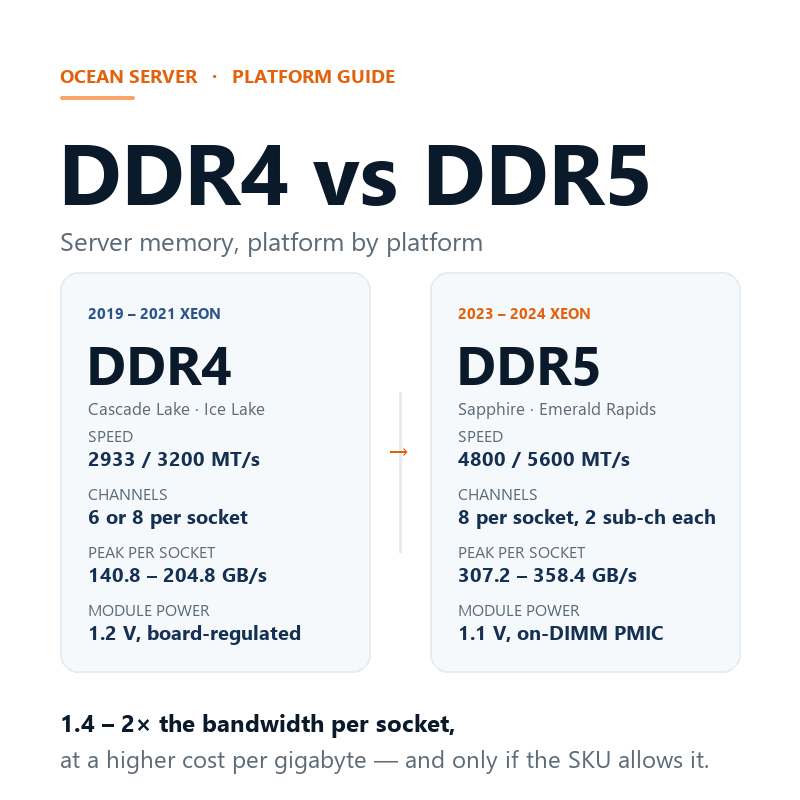
- Speed and voltage. Server DDR4 tops out at 3200 MT/s at 1.2 V, with voltage regulation handled on the board. Server DDR5 starts at 4800 MT/s and reaches 5600 MT/s on current Xeon platforms, at 1.1 V regulated by a PMIC (power-management IC) mounted on the module itself.
- Sub-channels. Each DDR5 DIMM is split into two independent 32-bit sub-channels instead of one 64-bit channel. Transfers are smaller and more concurrent, which reduces contention when multiple cores are fetching at once. That is part of why DDR5 sustains its higher headline rates better than a raw frequency comparison suggests.
- Error correction. DDR5 DRAM chips correct single-bit errors internally (on-die ECC) in addition to the registered, system-level ECC every server DIMM has always carried. It does not replace system ECC; it adds a layer closer to the cells.
- Density. High-capacity 3DS RDIMMs reach 256 GB per module on DDR5, a density DDR4 mainly served through LRDIMMs. On platforms with a limited number of slots, that is often the only way to reach 4 TB and beyond per socket.
None of this is backward-compatible. The notches are in different positions, the electricals differ, and DDR5’s on-module PMIC changes how power is delivered. A DDR5 DIMM will not seat in a DDR4 slot, and vice versa.
Which Xeon generations take which memory
Memory generation is fixed by the platform, not by preference. Here is the mapping across the Xeon generations most commonly sourced on the secondary market, with the theoretical peak bandwidth per socket (channels × transfer rate × 8 bytes, one DIMM per channel):
| Platform | Xeon generation | Memory | Channels | Peak per socket |
|---|---|---|---|---|
| Cascade Lake-SP | 2nd Gen | DDR4-2933 | 6 | 140.8 GB/s |
| Ice Lake-SP | 3rd Gen | DDR4-3200 | 8 | 204.8 GB/s |
| Sapphire Rapids | 4th Gen | DDR5-4800 | 8 | 307.2 GB/s |
| Emerald Rapids | 5th Gen | DDR5-5600 | 8 | 358.4 GB/s |
| Granite Rapids-AP (Xeon 6 6900P) | Xeon 6 P-core | DDR5-6400 (MRDIMM to 8800) | 12 | 614.4 GB/s |
The same split runs on the AMD side: EPYC 7002/7003 (Rome, Milan) are 8-channel DDR4, while EPYC 9004 and 9005 (Genoa, Turin) are 12-channel DDR5. Whatever the vendor, the pattern since 2023 is the same: more channels and a faster bus.
In practical terms, a fleet standardized on parts like the Xeon Platinum 8260 is riding a 140.8 GB/s memory subsystem per socket, while Ice Lake parts such as the Xeon Gold 6338 or Xeon Gold 5318Y already doubled that to 204.8 GB/s with eight DDR4-3200 channels. Sapphire Rapids raised it again to 307.2 GB/s.
The bandwidth arithmetic: when DDR5 actually pays
A 1.4–2× bandwidth increase does not translate into a 1.4–2× application speedup. Whether it pays depends almost entirely on the workload:
- Memory-bound workloads feel it directly. Virtualization hosts with high consolidation ratios, in-memory databases, analytics engines, CFD and other HPC codes all spend their cycles waiting on memory. On those, the step from 204.8 to 307.2 GB/s is visible in dashboard metrics, not just benchmarks.
- Compute-bound workloads see little. Batch jobs that saturate cores on cache-resident data, web serving, and most single-application line-of-business loads will not notice the difference. The CPU’s core count and clocks dominate.
- Density can matter more than speed. For datasets that outgrow the chassis, DDR5’s 256 GB modules and higher slot counts (12 channels on Xeon 6 and EPYC 9004/9005) change what fits in a single socket. Sometimes the real upgrade is fitting the workload at all.
2026 pricing: the gap became structural
Through most of the DDR5 transition, memory pricing worked against the newer generation but not dramatically so. That ended in 2026. AI datacenters are consuming fab capacity for HBM, which takes roughly three times the wafer allocation of conventional DRAM per bit sold, and the conventional DRAM market has repriced accordingly.
One integrator’s published street-price tracking put DDR5 ECC RDIMM at roughly $31 per gigabyte in September 2026, up about 27% from March; the same tracking had DDR4 RDIMM around $5.5–$7.5 per gigabyte. DDR4 has not been spared, either: with the major manufacturers cutting DDR4 output, even 64 GB DDR4-2933 RDIMMs jumped around 28% over eleven weeks last quarter. Street prices vary by region, brand and batch, so treat these as orders of magnitude, not quotes.
The upshot for buyers: DDR4 still costs roughly four to five times less per gigabyte, and that gap is exactly what keeps extending the life of Ice Lake-era platforms for capacity-driven expansions. But the DDR4 discount is a shrinking-supply discount, not a bargain-bin price. DDR4 availability only goes one way from here, as we covered in our piece on EOL Xeon supply. A DDR4 buffer bought this year will be harder and pricier to replace in two.
The trap most listings hide: platform speed ≠ SKU speed
Here is the mistake we see most often, including from seasoned buyers: assuming every CPU on a DDR5 platform runs the platform’s maximum memory speed. It does not. Intel rates memory support per SKU, and the spread is wide:
- Sapphire Rapids tops out at DDR5-4800, but a Xeon Silver 4416+ runs memory at DDR5-4000, and a Gold 5418Y at DDR5-4400.
- Emerald Rapids tops out at DDR5-5600, but a Gold 6542Y runs DDR5-5200.
Buy DDR5-5600 modules for a machine built around the Silver 4416+ and every module clocks down to 4000. You paid a premium for speed the CPU will never use. The same logic applies across our inventory: check the specific part, not the generation. The listing for the Gold 5418Y states DDR5-4400; the Gold 6542Y states DDR5-5200. Both are correct, both are Emerald-and-Sapphire-class parts, and neither reaches the platform maximum.
Population rules trim the headline number further. Sapphire Rapids and Emerald Rapids both run RDIMMs at 4800/5600 with one DIMM per channel, and drop to DDR5-4400 with two DIMMs per channel. Buyers who need maximum capacity per socket are usually trading a speed step for it, which is fine as long as it is a decision and not a surprise.
Compatibility rules that do not bend
Whether you stay on DDR4 or move to DDR5, the same hard rules apply:
- Never mix memory generations. Different keying, different voltage delivery, different electronics. There is no adapter path and no hybrid board.
- Never mix RDIMM and LRDIMM in one system. The buffering differs; most boards refuse to train, and the ones that do not are running unsupported configurations.
- Keep sockets uniform. same capacity, same rank count, same speed grade, ideally the same part number, across every slot of a given socket.
- Update BIOS/BMC first. Memory training tables and high-capacity 3DS support ship in firmware; older builds simply will not POST with newer modules.
- Populate per the vendor’s manual. Slot order matters for both capacity and speed; the manual’s population table is not a suggestion.
So: stay on DDR4, or move to DDR5?
Staying on DDR4 makes sense when your workloads are compute-bound, your fleet is already standardized on Ice Lake or Cascade Lake parts, the goal is capacity rather than bandwidth, and downtime windows are tight. Four-to-five-times-cheaper memory per gigabyte is a real argument, and a DDR4 buffer bought now is the cheapest capacity you will ever add to those platforms.
Moving to DDR5 makes sense when you are building new, when virtualization density or memory-resident datasets are pushing against bandwidth rather than core count, when you need the platform’s other upgrades (PCIe 5.0, AMX, CXL), or when your planning horizon is long enough that DDR4’s shrinking supply becomes your problem. Parts like the Gold 6542Y and the wider Sapphire Rapids line are the value entry into that ecosystem today.
The uncomfortable middle ground is the fleet expansion on a DDR4 platform whose memory budget now rivals a platform migration. That is exactly the situation to price out both ways, and to buy DDR4 spares for if DDR4 is the answer.
Sourcing both platforms from us
We stock and actively source both sides of this divide: DDR4-era Ice Lake and Cascade Lake Xeons, and DDR5-era Sapphire Rapids and Emerald Rapids parts, every CPU load-tested before dispatch and shipped with a warranty. Browse the server processor catalog for current availability, read our guide to verifying used CPUs before you order anywhere, or send us your fleet list and we will price the DDR4-versus-DDR5 question against your actual workloads.